814 字
4 分钟
在 Fuwari 中添加 “随机一篇文章” 功能
话不多说,立马开整
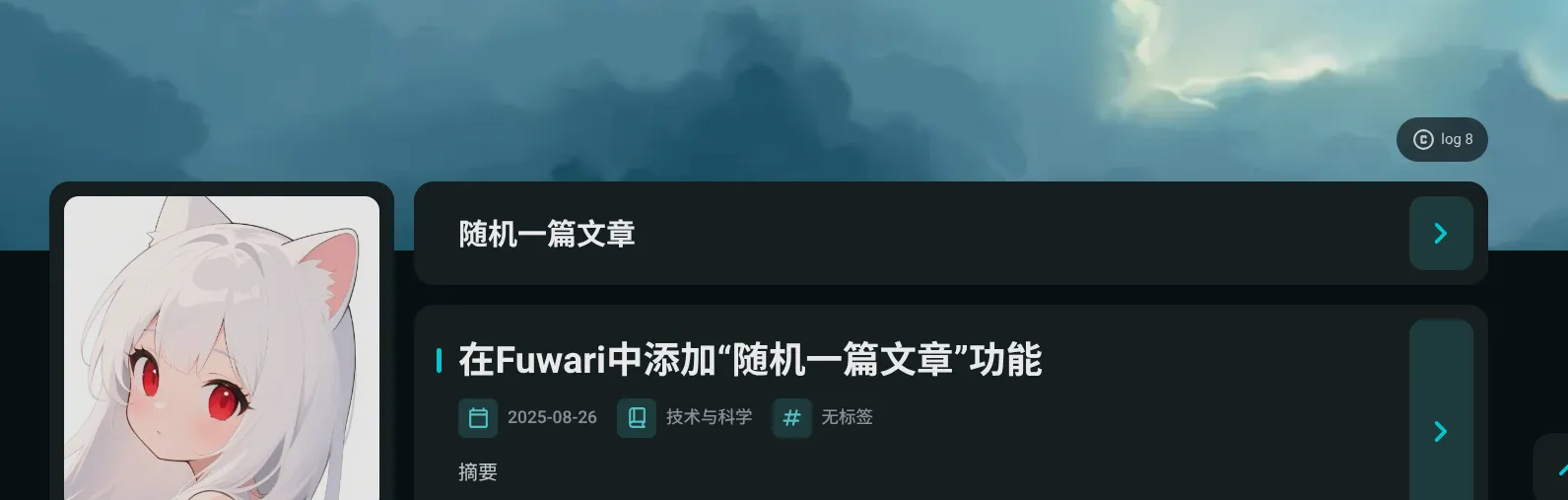
部署前,请先阅读以下事项
- 因为本博客的历史原因,仅随机带标签的文章,忽略没有标签的文章,如果要去除此特性,需要修改以下代码:
- 包含此组件的页面在进行过渡动画时可能有轻微的抽搐、卡顿感,原因未知。
第一步:创建组件#
在src/components中,创建文件RandomPostCard.astro,并且写入以下内容:
---import { getCollection } from 'astro:content';import { getPostUrlBySlug } from '../utils/url-utils';import { Icon } from 'astro-icon/components';
// 1. 先判断当前页面是否为首页(仅主页执行后续逻辑)const isHomePage = Astro.url.pathname === '/';let postUrls = [];
// 2. 仅主页获取文章 URL(非主页跳过,减少无效计算)if (isHomePage) { const posts = await getCollection('posts'); postUrls = posts .filter(p => !p.data.draft && p.data.tags.length > 0) .map(p => getPostUrlBySlug(p.slug));}---
{/* 3. 核心条件:仅当是首页时,才渲染整个组件 */}{isHomePage && ( <> {postUrls.length > 0 ? ( <!-- 外层容器:添加 ID 对应样式,确保在 Swup 容器内 --> <div id="random-post-card" class="card-base flex flex-col w-full rounded-[var(--radius-large)] overflow-hidden relative onload-animation " style="animation-delay: calc(var(--content-delay) + 0ms);" data-post-urls={JSON.stringify(postUrls)} > <!-- 标题区域链接 --> <div class="pl-6 md:pl-9 pr-6 md:pr-2 pt-6 md:pt-7 pb-6 relative w-full"> <a href="#" class="random-post-link transition group w-full block font-bold text-2xl text-90 hover:text-[var(--primary)] dark:hover:text-[var(--primary)] active:text-[var(--title-active)] dark:active:text-[var(--title-active)] md:before:block" style="text-align: left;" aria-label="随机文章" > 随机一篇文章 <Icon class="inline text-[2rem] text-[var(--primary)] md:hidden translate-y-0.5 absolute bottom-7" name="material-symbols:chevron-right-rounded" /> <Icon class="text-[var(--primary)] text-[2rem] transition hidden md:inline absolute translate-y-0.5 opacity-0 group-hover:opacity-100 -translate-x-1 group-hover:translate-x-0 bottom-7" name="material-symbols:chevron-right-rounded" /> </a> </div>
<!-- 右上角跳转按钮 --> <a href="#" class="random-post-link !hidden md:!flex btn-regular w-[3.25rem] absolute right-3 top-3 bottom-3 rounded-xl bg-[var(--enter-btn-bg)] hover:bg-[var(--enter-btn-bg-hover)] active:bg-[var(--enter-btn-bg-active)] active:scale-95" style="--coverWidth: 28%;" aria-label="进入随机文章" > <Icon name="material-symbols:chevron-right-rounded" class="transition text-[var(--primary)] text-4xl mx-auto" /> </a> </div> <div class="transition border-t-[1px] border-dashed mx-6 border-black/10 dark:border-white/[0.15] last:border-t-0 md:hidden"></div> ) : ( <p class="text-center py-6">没有可用的文章</p> )}
<!-- 4. 脚本逻辑:仅主页加载(随组件一起被条件包裹) --> <script is:inline> (function() { try { const container = document.querySelector('[data-post-urls]'); if (!container) throw new Error('未找到文章 URL 容器');
// 解析文章 URL 列表 const postUrls = JSON.parse(container.dataset.postUrls || '[]'); if (!Array.isArray(postUrls) || postUrls.length === 0) throw new Error('无有效文章 URL');
// 生成随机 URL(保留原有路径处理逻辑) const randomIndex = Math.floor(Math.random() * postUrls.length); let randomUrl = postUrls[randomIndex]; if (randomUrl && typeof randomUrl === 'string') { if (!randomUrl.startsWith('/') && !randomUrl.startsWith('http')) { randomUrl = '/' + randomUrl; } } else { throw new Error(`无效 URL 格式: ${randomUrl}`); }
// 仅设置 href,不阻止默认行为(Swup 会自动拦截链接) const links = document.querySelectorAll('.random-post-link'); if (links.length === 0) throw new Error('未找到随机文章链接');
links.forEach(link => { link.href = randomUrl; // 确保 href 正确 link.addEventListener('click', function() { console.log('跳转到随机文章:', randomUrl); }); });
console.log('随机文章链接初始化成功,URL:', randomUrl); } catch (error) { console.error('随机文章功能异常:', error); // 异常时确保链接可正常跳转(降级处理) document.querySelectorAll('.random-post-link').forEach(link => { link.href = '/'; // 跳转到首页(可自定义降级路径) }); } })(); </script> </>)}第二步:使组件生效#
打开src/components/PostPage.astro文件,按照注释说明导入并激活组件,重点分别在第4和第13行:
---import { getPostUrlBySlug } from '@utils/url-utils'import PostCard from './PostCard.astro'import RandomPostCard from './RandomPostCard.astro' //导入组件const { page } = Astro.props
let delay = 0const interval = 50---
<div class="transition flex flex-col rounded-[var(--radius-large)] bg-[var(--card-bg)] py-1 md:py-0 md:bg-transparent md:gap-4 mb-4"> <!-- 激活组件 --> <RandomPostCard /> {page.data.map((entry, i) => ( <PostCard entry={entry} title={entry.data.title} tags={entry.data.tags} category={entry.data.category} published={entry.data.published} updated={entry.data.updated} url={getPostUrlBySlug(entry.slug)} image={entry.data.image} description={entry.data.description} draft={entry.data.draft} class:list="onload-animation" style={`animation-delay: calc(var(--content-delay) + ${(i+1) * interval}ms);`} /> ))}</div> 在 Fuwari 中添加 “随机一篇文章” 功能
https://fuwari.vercel.app/posts/fuwari博客改造计划为-fuwari-中添加-随机一篇文章-功能---pinpe-的云端/